Klarna is a "Buy Now, Pay Later" payment method allowing your customer to pay in installments.
Make yourself familiar with our API principles to ensure a resilient integration.
Product overview
Klarna allows your customer to:
- defer payment by 30 days
- spread the cost over a period of up to 36 months (with financing)
- pay the full amount immediately with "Pay Now" for card, local domestic or local bank transfer payments
- spread the cost over three (four in some markets) equal interest-free installments
Klarna manages the relationship and collection of future installment payments directly with your customer. You receive full funding upfront and are protected from the risk of unpaid installments.
For recurring integrations, please see Klarna (recurring).
Follow the link for the latest guidelines from Klarna.
| Payment type | Countries | Recurring | Reversals | Partial reversals | Disputes | Auth only | Auth and settlement (sale) |
|---|---|---|---|---|---|---|---|
| Pay Now, Pay in Parts, Pay Later, Financing | CH, CZ, DK, AT, BE, FI, FR, DE, GR, IE, IT, NL, PT, SK, ES, GB, NO, PL, AU, CA, HU, MX, NZ, RO, SE, US | ❌ |
|
| Handled directly via Klarna. We deduct the funds if the dispute is lost. | ✅ | ✅ |
Klarna sets transaction limits, which are regularly updated and dependent upon the merchant, payment option, and your customer's purchase history.
As a general guideline, limits typically range from 0,00 EUR to 10.000,00 EUR.
Refunds are completed through Klarna, arriving in your customer's account within 365 days. You can submit multiple partial refunds for one payment.
| Currency | Currency codes |
|---|---|
| Czech Koruna | CZK |
| Danish Krone | DKK |
| Euro | EUR |
| Norwegian Krone | NOK |
| Polish Złoty | PLN |
| Pound Sterling | GBP |
| Swedish Krona | SEK |
| Swiss Franc | CHF |
The simplest integration option.
Your customer is redirected from your site to Klarna’s hosted payment page to complete their payment.
You create a Klarna order using our APMs API, which returns a URL for the Klarna payment page that you redirect your customer to. After the transaction is completed, your customer is automatically redirected back to your site. You receive the payment confirmation asynchronously from us.
On completion of the payment journey, your customer receives a payment receipt from Klarna.
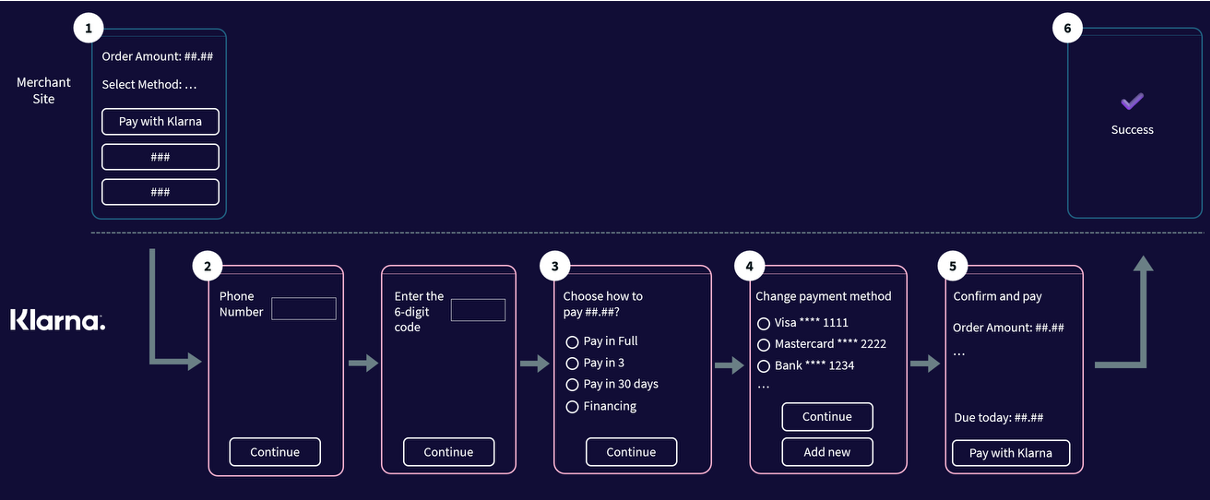
- Your customer chooses Klarna as their payment method.
- They log into Klarna (or create an account).
- Your customer chooses how they would like to pay (options differ per market).
- They set their funding source.
- Your customer confirms the payment.
- Klarna confirms that the payment is successful and returns your customer to your checkout confirmation page.
Requires additional development effort but provides an optimized customer experience, as the entire payment process takes place within your site using Klarna’s Web SDK.
With this fully integrated checkout flow, you can dynamically display Klarna’s branding, payment descriptors, and personalized messaging on your checkout pages.
You can present the Klarna payment page in a pop-up box over your website, allowing your customer to complete payment without a full-page redirect (although this is still possible if you wish).
Klarna provides two options for integration:
Option 1: Klarna Web SDK + our APMs API
You embed Klarna’s Web SDK directly into your checkout page. You create the request with our APMs API and the response is used to initialize the Klarna SDK, which then displays the payment interface on your site. You receive the payment confirmation asynchronously from us.Option 2: Klarna Web SDK + Klarna API/webhooks + our APMs API
You embed Klarna’s Web SDK in your checkout page and integrate with Klarna’s API and webhooks. You create and manage the Klarna session directly with Klarna through server-side calls. As a final step, you provide the “Klarna Network Session Token” as theproviderTokento the APMs API to complete the payment.
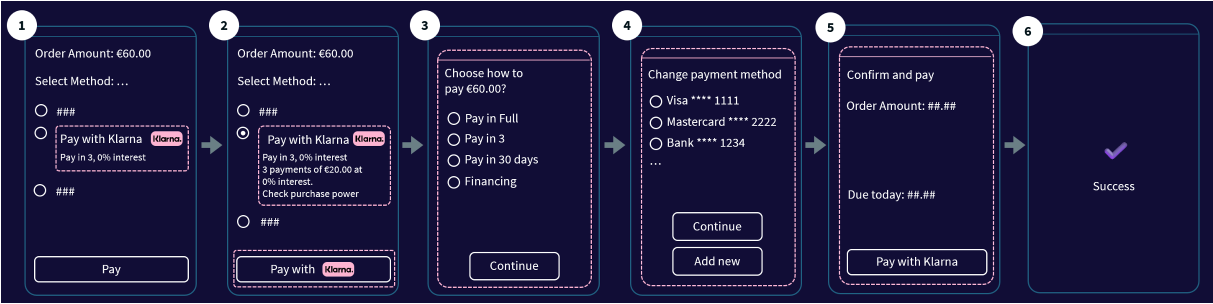
- Your customer reviews all available payment methods on your checkout page. Klarna is presented with dynamic text.
- They select Klarna and are presented with an illustration of a possible split. The Pay button is dynamically updated to “Pay with Klarna”.
- Your customer logs into Klarna (or creates an account). They choose how they would like to pay (options differ per market).
- Your customer sets their funding source.
- They confirm the payment.
- Klarna confirms that the payment is successful and returns your customer to your checkout confirmation page.
Depending on your business type or the goods you sell, you may need to provide additional transaction details, such as order line items, subscription information, or mandatory industry-specific attributes.
Providing “supplementary purchase data” with Klarna offers greater context for each transaction, increasing their underwriting accuracy and strengthening their fraud assessment. The more information you share, the better your customers' experience and the greater the chances of increased acceptance rates and enhanced fraud prevention.
You have the option to provide supplementary purchase data in two formats:
- Option 1: You can pass specific data fields individually as structured elements within the payment request.
- Option 2: Klarna data - You can include all necessary information encapsulated as a JSON string within the
passthroughDatafield, using Klarna’s “Klarna Network Data for Acquiring Partners" schema.
You can also combine the two options, e.g. sending “line items” as structured data while using “Klarna network data” for specific details like event information.
You can see examples of the types of industry-specific transaction details that we support below. The "Guest" example demonstrates option 1, while the industry-specific examples demonstrate the use of Klarna data outlined in option 2.
Please note that if the same object is provided in both formats, Klarna prioritizes using “Klarna network data” for risk assessment purposes, while the structured “line items” are displayed to your customer during the Klarna purchase flow.
Use our API reference and set your headers.
POST https://try.access.worldpay.com/apmPayments
- Tryhttps://try.access.worldpay.com/apmPayments
- Livehttps://access.worldpay.com/apmPayments
{
  "transactionReference": "Memory265-13/08/1876",
  "orderReference": "apm-order-12345",
  "merchant": {
    "entity": "default"
  },
  "instruction": {
    "method": "ach",
    "narrative": {
      "line1": "MindPalace"
    },
    "value": {
      "amount": 750,
      "currency": "USD"
    },
    "paymentInstrument": {
      "type": "direct",
      "accountType": "checking",
      "accountNumber": "01234567890123456",
      "routingNumber": "012345678",
      "checkNumber": "012345678901234",
      "companyName": "Worldpay",
      "billingAddress": {
        "address1": "8500 Governors Hill Drive",
        "address2": "Symmes Township",
        "postalCode": "45249",
        "city": "Ohio",
        "state": "US-OH",
        "countryCode": "US"
      }
    },
    "customer": {
      "firstName": "John",
      "lastName": "Johnson",
      "customerId": "43424",
      "email": "john@example.com"
    }
  }
}
For Bizum transactions, please follow this extra regex [a-zA-Z0-9]{4,12}
A reference that you can apply to one or more payments according to your business needs. You may reuse the same reference across multiple payments, for example where:
- the total amount for a single order is split across multiple payments
- you use a single reference for each payment in a recurring agreement or split shipment scenario
We suggest you provide the cancelURL,failureURL, pendingURL and successURL attribute to redirect your customer to, once you have received the payment result.
{
  "paymentInstrument": {
    "method": "klarna_network",
    "type": "direct"
  },
  "paymentId": "eyJrIjoiYXBtLXNlcnZpY2UtZGVmYXVsdCIsImxpbmtWZXJzaW9uIjoiNi4wLjAifQ==.BnnxxcMle38OazhwbF8J+4rtJi8CAq:Y3zUOn1dw6VWfvx:PHL5L0S+5ara5vz6ouV5yBmVUQCiSwQjs+1x5qJIJxAKWMWc2Mlb1doricEYlzsZIRIGCflvnYu1Ns8g1S0+66n6wCELiB9OHfX7cdCRSkT0a4UjAkBr16y36rhHD8i3MfeowBaRA60gR5WdTem66NOYspir3PJsMwGsI7JUSNUzNfcyYf:9A8ONjOcqG6UxedN+MVzWk3lOYs4HS580KRMMNREpmBeBMSEX5ykio0WGxZ:7eYQxnPFsTnA:7:SEfTDcAZofBDiAWAe+s8H9:TD3hQpRcoIM3I9mxkgdPhXDL2OFpFf7pNzE4GPA9QEPQrIYQg:q3eZ7ziTPGD:iOAJXRIEuMq+GdkYs3SWlTzbiGM76:BcqQDY0BAUI9GaFhKLR:b0g9SIKK71Rk9YpTLeiVSfZMnt+9116oW2VHgWW6AoAt202XuJ0AU7aToTM6HDqlAkiOs66Po3TBIlIqmMW0DQb44taw0DeEnQ==",
  "lastEvent": "pending",
  "_links": {
    "self": {
      "href": "https://try.access.worldpay.com/apmPayments/eyJrIjoiYXBtLXNlcnZpY2UtZGVmYXVsdCIsImxpbmtWZXJzaW9uIjoiNi4wLjAifQ==.BnnxxcMle38OazhwbF8J+4rtJi8CAq:Y3zUOn1dw6VWfvx:PHL5L0S+5ara5vz6ouV5yBmVUQCiSwQjs+1x5qJIJxAKWMWc2Mlb1doricEYlzsZIRIGCflvnYu1Ns8g1S0+66n6wCELiB9OHfX7cdCRSkT0a4UjAkBr16y36rhHD8i3MfeowBaRA60gR5WdTem66NOYspir3PJsMwGsI7JUSNUzNfcyYf:9A8ONjOcqG6UxedN+MVzWk3lOYs4HS580KRMMNREpmBeBMSEX5ykio0WGxZ:7eYQxnPFsTnA:7:SEfTDcAZofBDiAWAe+s8H9:TD3hQpRcoIM3I9mxkgdPhXDL2OFpFf7pNzE4GPA9QEPQrIYQg:q3eZ7ziTPGD:iOAJXRIEuMq+GdkYs3SWlTzbiGM76:BcqQDY0BAUI9GaFhKLR:b0g9SIKK71Rk9YpTLeiVSfZMnt+9116oW2VHgWW6AoAt202XuJ0AU7aToTM6HDqlAkiOs66Po3TBIlIqmMW0DQb44taw0DeEnQ=="
    }
  },
  "_actions": {},
  "redirect": "https://secure-test.worldpay.com/jsp/test/shopper/APMSTSimulator.jsp?customerRef=3501456267&paymentMethod=KLARNA_NETWORK",
  "commandId": "cmdF3buj-w58hiyu4I-QZqZi0"
}The identifier of the payment resource.
Links to resources related to the request.
The URL to redirect your customer to, or a QR code in Base64 to show to your customer, in order to complete the transaction.
An action ID generated by us, identifying a single merchant interaction.
Payment instrument for: ACH, Alipay China, Alipay Hong Kong, Alipay Plus, BANCOMAT Pay, Bancontact, Bizum, BLIK, EFT, Euteller, iDEAL guest, iDEAL recurring, Klarna, Klarna (recurring), Konbini, Multibanco, MyBank, Open Banking, PaysafeCard, Pix, Przelewy24, SafetyPay, Satispay, Swish, Trustly, China UnionPay, WeChat Pay.
For Pix payments - display to your customer for them to copy and paste in the Pix app.
For Swish payments - use this value as the {token} in the custom URL scheme: swish://paymentrequest?token={token}&callbackurl={callbackURL}. This will prompt the app to open, allowing your customer to complete their payment.
Check out our API reference for more responses or error codes.
To simulate payment outcomes and trigger webhooks in our Try environment you can send a request prompting our simulator.
You receive a redirect link to our simulator where you can choose different payment outcomes:
| Simulator outcome option | Payment status | Description |
|---|---|---|
| Authorised | authorized | Payment authorized successfully. |
| Refused | refused | Unsuccessful payment - failure response from the provider. |
| Error | error | Error in processing the payment or the session timed out. |
| Shopper Cancelled | cancelled | Your customer cancelled the transaction. |
Query the payment to receive the desired payment status.
You can also send requests to settlement or reversal endpoints to test the following statuses:
sentForSettlementsentForRefund
Next steps