Last updated: 27 May 2026 | Change log
Take Alternative Payment Methods (APMs) using a secure, hosted iframe solution.
Integrate the SDK into your web application, ensuring a seamless and secure payment experience for your customers.
Contact your Worldpay Implementation Manager for your checkout id (in UUId format) and your credentials.
SDK initialization - load and configure the SDK in your web application.
UI rendering - the hosted component is embedded against a chosen selector on your checkout page.
Payment data collection - collect payment details securely via the iframe.
Session creation - receive a session from the SDK.
Payment submission - send the session to your backend for payment processing.
QR code APMs - handle QR code display and retrieve payment statuses for APMs (Pix, WeChat Pay, Swish).
Recurring transactions - process recurring payments for SEPA, Klarna (recurring) and iDEAL.
Add the Components SDK script to your web application:
<script type="module" src="https://js.worldpay.com/1.214.1/components.js"></script>Adding type="module" is required when loading components.js. The Components SDK is delivered as an ES module, so the browser must load it in module mode for Worldpay.components to be available.
You can initialize the SDK using a simple configuration.
<script type="module">
  const config = {
    id: "your-checkout-id",
    baseUrl: "https://try.access.worldpay.com",
    selector: "#payment-wrapper",
    transaction: {
      amount: 100,
      currency: "GBP",
      countryCode: "GB"
    },
    elements: [
      {
        element: 'accordion',
        methods: [{ name: 'alipay_cn' }, { name: 'paypal' }, { name: 'sepa' }, { name: 'blik' }, { name: 'swish' }],
      },
    ],
    advancedConfiguration: {
      additionalFields: [`name`, `email`, `dob`, `phone`, `shippingAddress`, `billingAddress`, `identityDocuments`]
    }
  }

  Worldpay.components.init(config)
</script>| Parameter | Description |
|---|---|
id | Checkout merchant ID. |
baseUrl | The URL for our try/live environment. |
selector | The DOM selector where the iframe is mounted. |
transaction | An object containing payment details. |
amount | The transaction amount in minor units (e.g., pence for GBP). |
currency | The ISO currency code. |
countryCode | The ISO country code. |
loadingSkeleton | Enables a loading skeleton while the iframe is initializing. |
elements and methods | Defines the elements and payment methods. |
Customers enter their payment details directly into the hosted iframe. The SDK handles validation and securely transmits the information to us. We process and store the data and send you an encrypted session.
Once payment details are entered and validated, the SDK returns a session representing the payment data.
<script type="module">
  Worldpay.components.init(config)
    .onSuccess((session, method) => {
      console.log(session) // "https://try.access.worldpay.com/sessions/eyJrIjoxLCJkIjoiWnRLYmErUUNkOTRnc2NUZ3Z5..."
      console.log(method) // e.g. "paypal"
  })
</script>
You can then apply the session directly in our APMs API.
- Set
instruction.paymentInstrument.type": "checkout" - Apply the session in the value for
instruction.paymentInstrument.sessionHref
The data you can collect with the SDK is directly mapped to our APMs API. This is then passed in the encrypted session, meaning you don't need to re-supply it. The SDK maps the APMs API field as follows:
| additionalFields | SDK display name | APMs API service mapping |
|---|---|---|
billingAddress | Billing Address | instruction.paymentInstrument.billingAddress |
shippingAddress | Shipping Address | instruction.shipping |
email | Email Address | instruction.customer.email |
name | First Name | instruction.customer.firstName |
name | Last Name | instruction.customer.lastName |
phone | Telephone Number | instruction.customer.phone |
dateOfBirth | Date of Birth | instruction.customer.dateOfBirth |
identityDocuments | CPF/CNPJ | instruction.customer.identityDocuments.reference |
identityDocuments | CPF/CNPJ | instruction.customer.identityDocuments.type |
| Payment method | Initializing request payment name |
|---|---|
| ACH/eCheck | ach |
| Alipay China | alipay_cn |
| Alipay Hong Kong | alipay_hk |
| Alipay+ | alipay_uni |
| Bancontact | bancontact |
| BLIK | blik |
| Euteller | euteller |
| iDEAL | ideal |
| Klarna (recurring) | klarna |
| Konbini | konbini |
| Multibanco | multibanco |
| MyBank | mybank |
| Open Banking | open_banking |
| Przelewy24 | przelewy |
| PayPal | paypal |
| PaysafeCard | paysafecard |
| Pix | pix |
| SafetyPay | safetypay |
| SEPA Direct Debit | sepa |
| Swish | swish |
| Trustly | trustly |
| WeChat Pay | wechatpay |
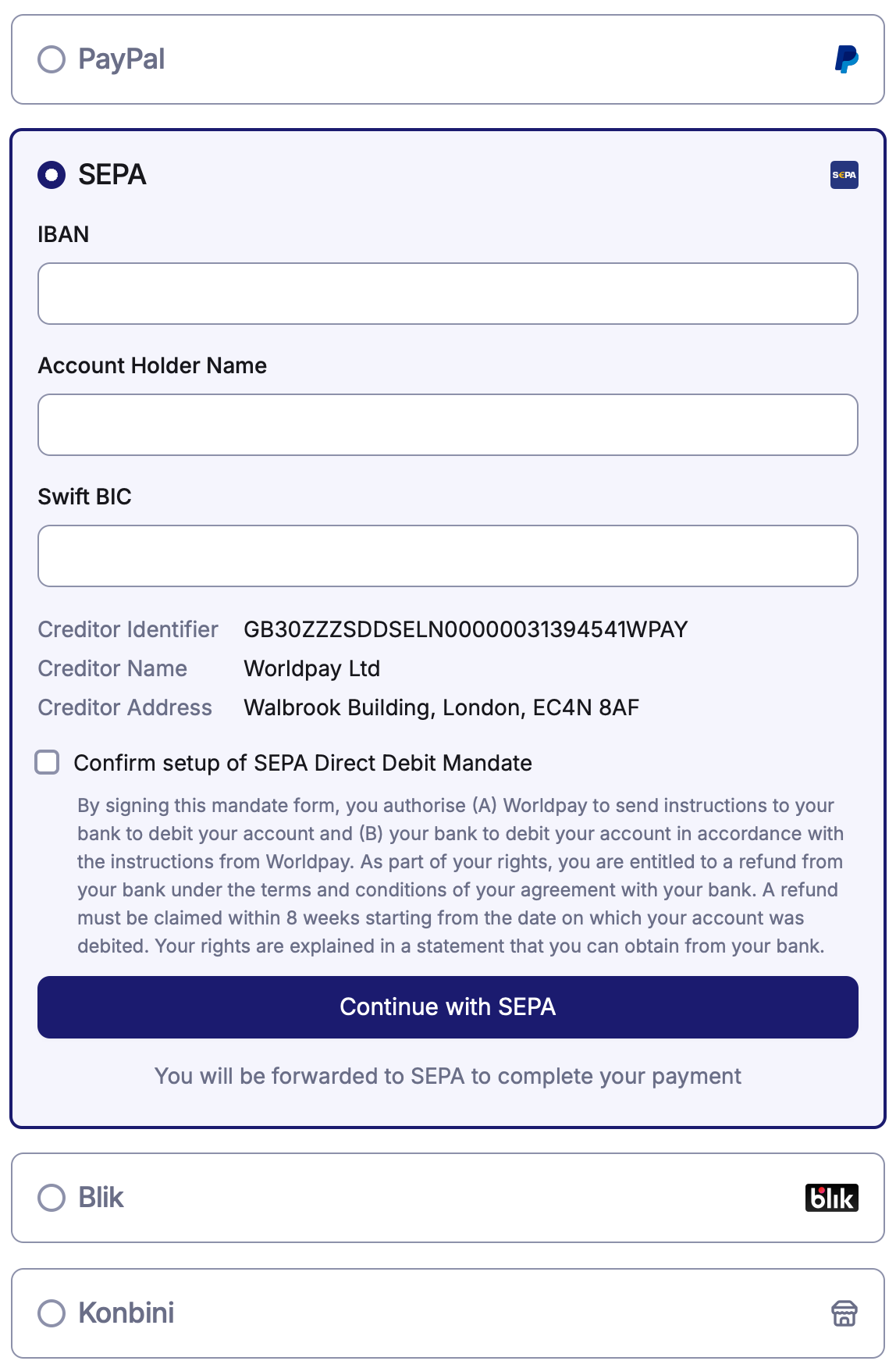
<script type="module">
  Worldpay.components.init({
    // ...other config
    elements: [
      {
        element: "accordion",
        methods: [
          { name: "paypal" },
          { name: "sepa" },
          { name: "blik" },
          { name: "konbini" }
        ]
      }
    ]
  })
</script>